🤖 5 Years of AI-Assisted Coding
In 2021 I wrote my first thoughts about GitHub Copilot Technical Preview. A lot has happened since then, so I think it’s time to recap some things I have learned in the process of integrating coding with AI:
📃 Content:
- 🚀 Is AI a bubble?
- 💥 Is this the end of Software Engineering?
- 👩🏻💻 How to Code in 2026?
- 📈 Chronology and Milestones
- 🧠 AI Concepts
- 📚 Effective Context Control
- ♻️ The loop
🚀 Is AI a bubble?
Is this a bubble, or are we living in the future?. Sometimes it feels like we can now use some alien technology 👽 and everything is going to be exponential. But on the other hand, you look around and everyone is doing more or less the same, from big companies to students: same models, similar prompts, similar skills, solving similar problems… and it doesn’t look like everyone is rich now or anything, does it? 🤔 For me the answer is: it’s both things at the same time, a bubble and a revolution.
At least we know some things: over the last 2 years the industry has radically changed, and productivity has increased dramatically (at least in some specific tasks). We are probably among the first to notice it deeply before the rest of society.
💥 Is this the end of Software Engineering?
So, is programming dead in 2026?. I don’t think so, but that was never the goal. The goal, as a software engineer in the industry, is to solve real problems, generate impact, and add value by putting solutions on the table. Software is the means, not the end.
AI does not destroy this concept, it elevates and empowers the Software Engineer role.
👩🏻💻 How to Code in 2026?
So, what do you need to use to stay relevant in the industry nowadays:
Use Prompt Engineering/Context EngineeringThis is not cool anymore, we are not in 2022.Use Vibe CodingThis is not cool anymore, we are not in 2025.Use Agentic EngineeringThis is not cool anymore, we are not in Q1 2026.Use Harness EngineeringThis is not cool anymore, we are not in Q2 2026.Use Loop EngineeringThis is not cool anymore, we are not in June 2026.- Use Graph Engineering, this is the cool thing now.

Well, in reality, it is not that easy, but I will try to cover all the topics I found relevant in this field. But first, I want to put things into perspective, focusing only on LLMs and transformer-based AIs. I will avoid diffusion models:
📈 Chronology and Milestones
If we look at the timelines of OpenAI, Anthropic, Google DeepMind, DeepSeek, and other labs, we get something like this:
- 2017:
- Attention Is All You Need research paper introduced the transformer neural architecture.
- 2020:
- OpenAI GPT-3: Demonstrated for the first time a surprising ability to generate functional code blocks from natural language (initially not designed for that).
- Retrieval-augmented generation (RAG) architecture appeared.
- 2021:
- GitHub Copilot appeared, powered by OpenAI Codex, a modified production version of GPT-3 fine-tuned on source code in multiple programming languages.
- Implementation of functions described in comments.
- Chat mode with offering multiple solutions to a problem.
- Ghost Text, predictive autocomplete as you typed code manually.
- 2022:
- ChatGPT 3.5, the fastest-growing technology product in history, reaching 100 million MAUs (monthly active users) in 2 months.
- New tool: n8n.
- Prompt Engineering/Context Engineering appeared.
- 2023:
- New models: GPT-4, Claude 1, Claude 2, Gemini 1.0.
- New tool: NotebookLM by Google.
- Multimodal capabilities and Computer Vision: LLMs can process, generate and edit voice and images.
- 2024:
- New models: Gemini 1.5 Pro, Claude 3 Opus, Grok-1, DeepSeek V2, GPT-4o, Claude 3.5 Sonnet, o1-preview.
- New tools: Cursor, v0 by Vercel, Windsurf, Lovable, and Notion AI.
- Autonomous Agents appeared.
- @Mention files (Cursor), routes, lines of code for agent context.
- Agent Rules (Cursor).
- Anthropic introduced Model Context Protocol (MCP).
- Windsurf introduced Agent Cascade mode: the agent itself executes commands, reads execution output and indexes code automatically.
- Nvidia first became the world’s most valuable company.
- llms.txt appeared, an LLM-friendly version of the robots.txt for AI models.
- Google DeepMind introduced o1, first Reasoning Model and Test-Time Compute paradigm began.
- 2025:
- New models: Claude Sonnet 3.7, Claude Opus 4.1/4.5, DeepSeek-V3 R1, GPT-4.5, Gemini 2.5, GPT-4.1, o3, o4.
- New tools: Claude Code CLI, Opencode.
- Agents now have native integration with Git and system tools.
- VS Code GitHub Copilot agent mode appeared.
- Vibe Coding appeared.
- Subagents (Claude), enabling Multi-Agent Orchestration.
- OpenClaw, autonomous artificial intelligence agent appeared.
- 2026:
- New models: Claude Sonnet 4.6/5, Opus 4.6/4.7/4.8/5, GPT-5.1/2/3/4/5/6-6 Astra, GPT-5-Codex, Sol, Terra, Luna, Astra, Mythos 5/5.1, Fable 5/5.1, Gemini 3.1/pro/3.5/3.8, Muse Spark 1.3, Grok 4.6, Kimi K3, DeepSeek V4.
- Agent Skills (Claude).
- Agent Hooks (Claude).
- Agentic Engineering appeared.
- Adaptive thinking (Claude).
- Harness Engineering appeared.
- Agents now do Self-Verification and proactive, autonomous error fixing.
- Background Sandbox Agents (Cursor) and Agent Sandbox (Claude).
- GitHub Copilot is not a plugin anymore, it is directly integrated into the Visual Studio Code codebase.
- ChatGPT reached 1 billion MAUs.
- Google introduced WebMCP, a proposed web standard that allows websites to explicitly declare their capabilities for AI Agents.
- ChatGPT Voice full duplex.
- Loop Engineering appeared.
- Graph Engineering appeared.
- OpenAI solves Navier–Stokes Millennium Prize Problem.
🧠 AI Concepts
1. What is LLM?
Modern large language models (LLMs) are neural networks trained to predict the next token. That’s it. They are typically based on transformer architecture.
You can see how internally an LLM works at LLM Visualization:
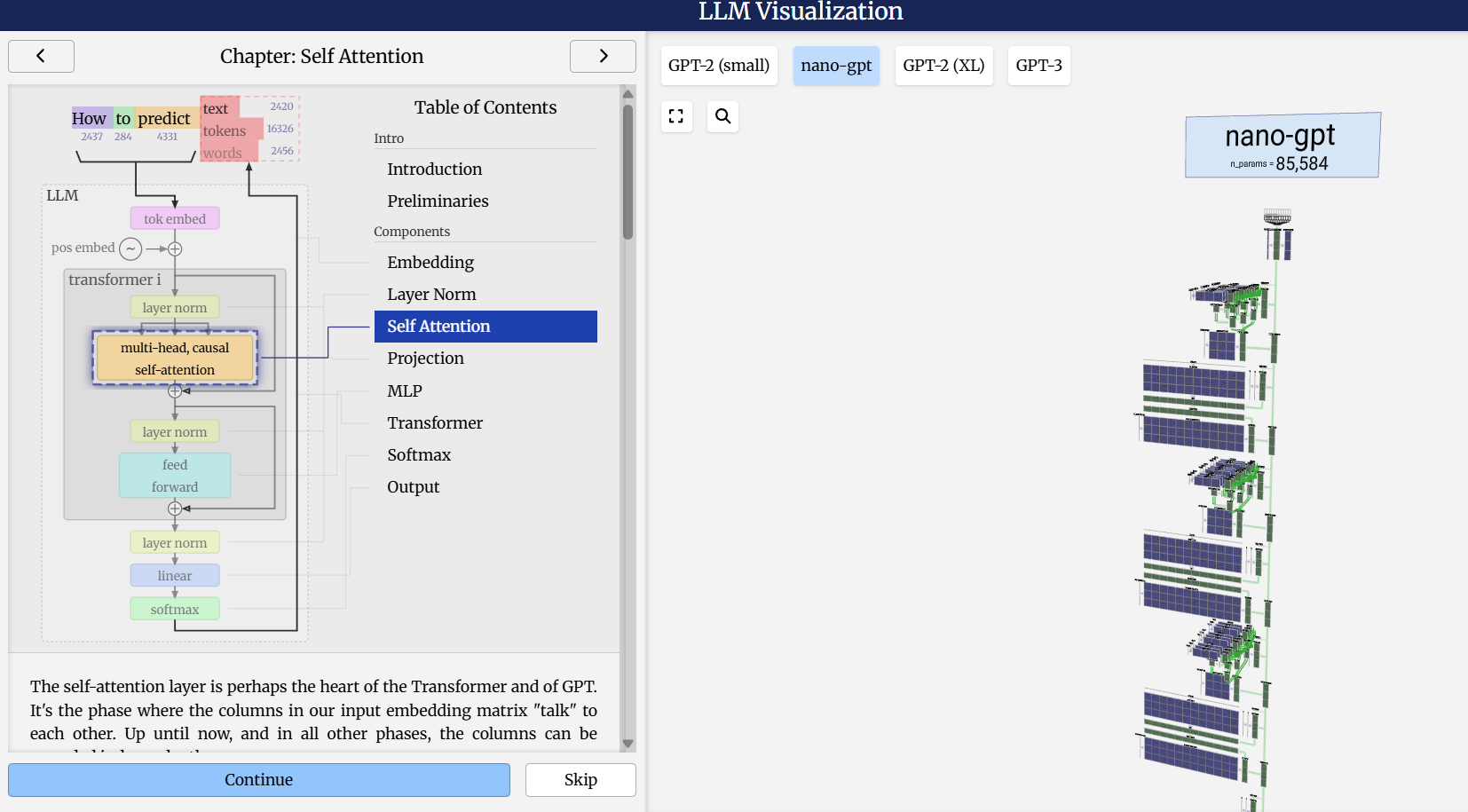
To generate a full response, they use an iterative prediction loop. Once they generate the next token, they add it to the context and guess the following one, repeating this loop over and over. The key idea here is that the whole output text is not predicted at once. It predicts one token at a time using accumulated context.
This process is so fast and accurate these days that it feels like magic 🤯, but they are basically mathematical algorithms under the hood, trained with huge amounts of data.
2. What is a Token?
Text is first broken into units called tokens, which can be words, character sequences, or combinations of words. The LLM analyzes the semantic relationships between tokens, such as how commonly they’re used together or whether they’re used in similar contexts. After training, the LLM uses those patterns and relationships to generate a sequence of output tokens based on the input sequence.
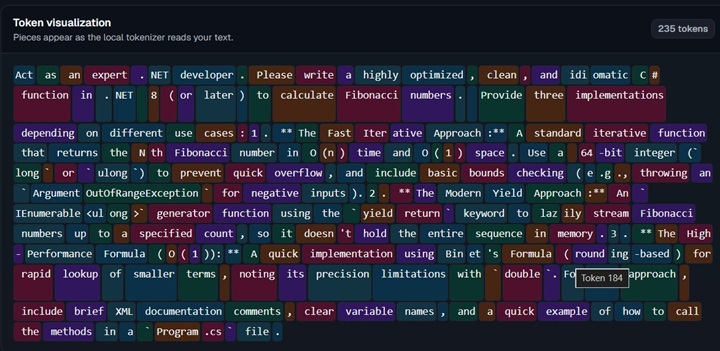
More tokens means higher cost. Each LLM has different tokenization, which means the same prompt can have a different number of tokens depending on the model.
Notice also that input tokens are different from output tokens. Generally, LLM providers bill based on total token consumption.
Interesting tools to calculate token costs are: tiktoken, Claude Token counting, Cognio Labs Token Counter, and token-calculator.
3. What is a Context Window?
The context window is the maximum amount of data or tokenized input available to the model at one time when generating output.
Nowadays, we can have 1 million-token context windows, but bigger context windows can make AI worse. There are known problems like Lost in the Middle. Smaller context windows often work much better. So it is better to open a new context window when the current one is over 40-60%, instead of filling it completely.
📚 Effective Context Control
We all have limited human time and attention. That’s why AI can boost productivity.
The industry is moving toward strategies where models do reliable work. This means human work is to design environments, specify intent, and build feedback loops that allow coding agents to do the right work.
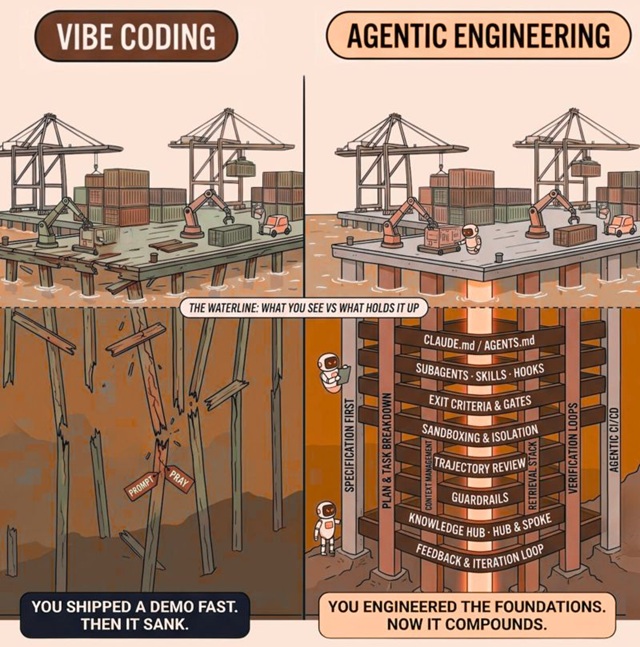
No matter how good the model is, no guidance equals disaster. Basically, you become a facilitator for agents doing autonomously supervised (or unsupervised) work.
👉 AI is a multiplier of what already exists, so everything is about Context:
Good Context: Clearly defined goals, good inputs, a well-documented process, relevant data, well-defined verification, etc. Ends in more value, faster and cheaper output.
Bad Context: Abstract goals, noisy input, weak process, no validation, etc. Ends in more rework, waste, mistakes, accidental complexity.
To set up this context control system (called a harness), we can use multiple components:
1. System / User Context
Notice that all agentic coding tools (Claude Code, GitHub Copilot, Cursor, Windsurf, OpenCode, Antigravity, etc.) use a base system context under the hood.
For example, check this simple hello world in .NET:
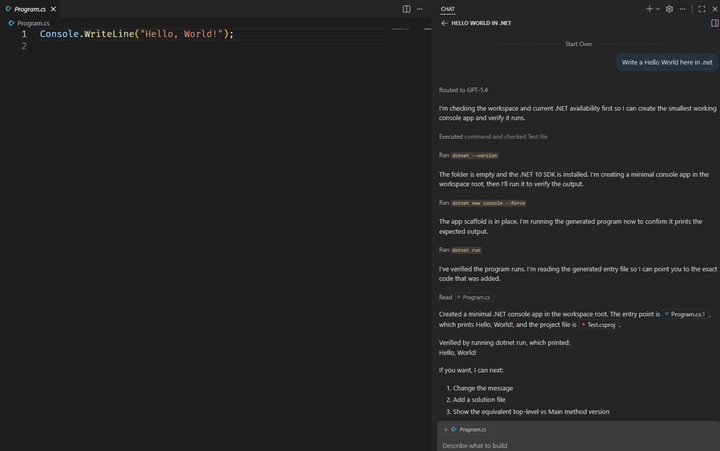
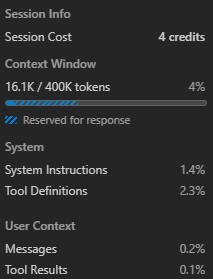
Notice in this build that the prompt is 8 tokens, but completing the whole hello world required 16.1k tokens. Notice also that there is System and User context.
In GitHub Copilot, we can enable Developer Chat Debug view to see the real behavior of the internals:
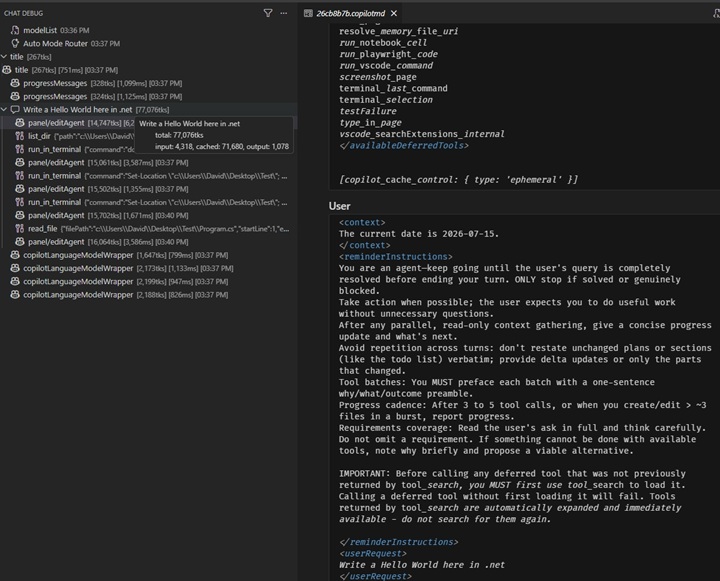
In a single request we will see:
Metadata: type, model we are using, token limits, timing, history, available tools (read files, search directories, API calls, custom MCPs, etc.).
System Context: This is known as the system prompt. It includes the base system instructions, capabilities, and constraints given to Copilot, such as copyright restrictions, security checks, permissions, policies, personality, etc.
User Context: Environment info, memory, user prompt.
Assistant Context: The whole request flow and all messages in the conversation.
Tool Context: All tool calls and outputs.
AI agents have no memory, just context windows. Once they process some information, they lose context and forget everything. Notice that they work in feedback loops, iterating to solve the prompt by adding more and more information to the context window. In each loop iteration, the whole context window is sent to the LLM servers.
In this case, for example, we need to deal with .NET commands and check the output to verify that the hello world program was created correctly. This creates bigger context windows and multiplies the number of API calls to the LLM provider, which means a higher cost.
2. AGENTS.md / CLAUDE.md
This is project-level context. These Markdown files should contain: project-level architectural guardrails, project structure, build and test instructions, code style guidelines, development best practices, etc.
Anthropic created CLAUDE.md. Later, the industry created the AGENTS.md standard. Some tools like GitHub Copilot nowadays support both, and can also specify their own copilot-instructions.md. Defining these files creates very powerful, tool-agnostic context management. This improves consistency and reduces errors.
⚠️ Notice that too much guidance becomes non-guidance. When everything is “important,” nothing is.
To avoid known problems with large context windows, keep it simple, concise, and small. This will result in more effective and less expensive agent sessions. Treat this as the onboarding directive for the AI.
Also, it’s better to split knowledge into multiple files and reference them, for example by file extension, backend, and frontend. For example:
## Code Style & Guidelines

Before reading or writing code, load the correct style guide:

- **For standard code (`*.cs`):** Use `docs/style-guides/main-style.md`.
- **For tests (`*.Test.cs`):** Use `docs/style-guides/test-style.md`.

Only read these files when working on matching file types.
⚠️ Take into account that less intelligent models rely more on direct knowledge than on indirect directives.
Also, Claude suggests creating separate rules files:
your-project/
├── .claude/
│   ├── CLAUDE.md           # Main project instructions
│   └── rules/
│       ├── code-style.md   # Code style guidelines
│       ├── testing.md      # Testing conventions
│       └── security.md     # Security requirements
⚠️ It is also important to say what to do, but even more important to say what not to do. Some models are less intelligent and won’t infer certain things.
3. Skills
The Agent Skills are modular capabilities to extend the agents. They should be domain-level context, used in reusable workflows.
For example we can have:
- Refactoring Skills.
- Testing Skills.
- Linters Skills.
- New endpoint creation Skill.
- New use case creation Skill.
- Library migration Skill.
- Observability and Telemetry Skills.
- Error debugging Skill.
- Feature toggle creation Skill.
- Database migration creation Skill.
- Security checks Skill.
- Performance Optimization checks Skill.
- Concurrency checks Skill.
- Scalability and High Availability Checks Skill.
- Documentation Skill.
- Planning Skill.
- Create PR Skill.
Here are some resources that can be interesting: eferro’s skill-factory, awesome-agent-skills.
A skill will look something like this:
# Skill: Hello

## Trigger
User says "hello"

## Action
Reply with this message:

> **Hello World!** The skill is active.
We can create skills using a skill, for example with skill-creator. There is also a skills standard in development.
And should be defined as follows:
your-project/
├── .claude/
│   ├── CLAUDE.md           # Main project instructions
│   └── skills/
│       └── my-skill/
│           ├── SKILL.md        # Main instructions (required)
│           ├── template.md     # Template for Claude to fill in
│           ├── examples/
│           │   └── sample.md   # Example output showing expected format
│           └── scripts/
│               └── validate.sh # Script Claude can execute
⚠️ Notice that the full skill is not in the context window, only the definition. Skills are loaded into the context only when used, like tools.
Too many skill definitions can cause conflicts for LLMs when selecting the right skill, and if tool definitions are too long, the context can also be affected. It’s better to have just the skills that are needed and disable the ones that are not needed.
Skills can be reusable between projects, so you can place them in different paths on your machine, like ~/.claude/skills/<skill-name>/SKILL.md . Also, GitHub Copilot supports these Claude Code paths.
Problem: skills are not deterministic 🎲. But we can create skills that run scripts, which are deterministic 😎, and we can use the computational power and flexibility of LLMs to refine those scripts 👀. This ends in predictable, testable behavior and fewer tokens, because we only need to add the output result of the script to the context.
⚠️ Security advice: Do not trust skills from the internet. There are many attacks these days that create vulnerable skills, including invisible prompt injection attacks. I recommend running skill security checks before use, such as Nvidia’s skillspector or Cisco’s skill-scanner.
4. MCPs
Basically, Model Context Protocol (MCP) servers are tools that LLMs can integrate with across many technologies. For example, you can check Awesome MCPs. MCPs can be remote or run on local networks.
Like skills, an MCP itself is not in the context window, just the definition. So from a token perspective, MCPs will not spend more tokens unless they are used. But remember that too many tools can affect the context.
Example of Playwright MCP config:
{
  "mcpServers": {
    "playwright": {
      "command": "npx",
      "args": [
        "-y",
        "@playwright/mcp@latest"
      ]
    }
  }
}
5. Hooks
Agent Hooks work exactly like Git Hooks. Basically, you can trigger the execution of a script at different parts of the agent execution lifecycle.
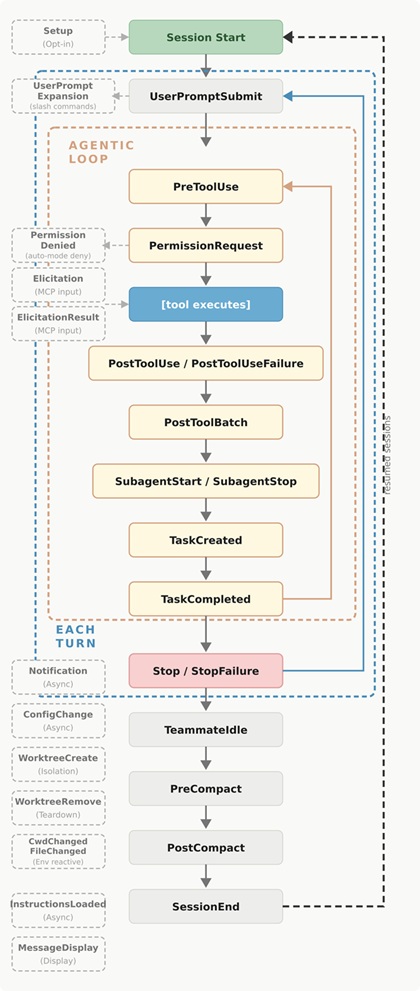
For example, a settings.json file could include this to run a lint every time the agent ends a session in the SessionEnd hook:
{
  "hooks": {
    "SessionEnd": [
      {
        "matcher": "",
        "hooks": [
          {
            "type": "command",
            "command": "npm run lint || npx eslint . --fix || true",
            "timeout": 30
          }
        ]
      }
    ]
  }
}
6. Subagents
Subagents enable task-specific workflows and improved context management. They can have different system instructions and different tooling.
This enables parallel work: for example, researching, extracting data, building tests, and validating. It also enables different models depending on purpose. For example, you can use an expensive reasoning model for planning and a cheaper model for writing a file.
The normal flow nowadays is to have one orchestrator agent, and multiple subagents that do specific tasks in isolated contexts. This results in better outputs. For example we can have something like this:
tdd-api-system/
├── CLAUDE.md                    # Orchestration protocol & TDD workflow steps
├── shared/
│   └── api_spec.json            # The API interface specification
└── agents/
    ├── 01_test_designer/
    │   └── config.md            # Writes tests *before* code based on the spec
    ├── 02_implementer/
    │   └── config.md            # Writes minimal code to make tests pass (Green)
    └── 03_refactorer/
        └── config.md            # Cleans code, removes duplication, checks style
♻️ The loop
AI is a democratic technology and everybody can run a prompt. It accelerates implementation and discovery, but also mistakes and mess if it’s used without control (harness). The challenge nowadays is not generating new code. It’s keeping work verifiable.
We need to impact the full workflow and set up limits. Our interactions with models should be productive, which means: correct, reviewable, and repeatable.